For independent occupational therapy practices

Offer immersive activity sessions that make your practice stand out.

CorteXR Studio helps independent OTs offer structured VR and AR activities that clients can experience, remember, and discuss. You get a more engaging session format, with observable task behaviour to bring into feedback and follow-up.

Available for selected private OT practices that want a more distinctive session offer.

Why it matters

Make sessions easier to value, remember, and explain.

Studio is not just a headset. It gives your practice a way to offer active, spatial tasks that feel different from worksheets, apps, or conversation-only sessions. Clients do something in the room, and you get clearer moments to observe, explain, and build on.

Practice value

A more memorable client experience

Give clients a structured activity they can experience directly, then talk about afterwards with you, their family, or their wider support network.

Practice value

More visible task behaviour

Use spatial tasks to observe how someone searches, chooses, sequences, hesitates, retries, responds to cues, and changes approach during the session.

Practice value

A clearer private-practice offer

Describe a distinctive service that is easy for clients, families, case managers, and referrers to understand: therapist-led immersive activity sessions.

Practice value

More tangible review conversations

Use activity summaries and repeated tasks to make change, effort, prompts, choices, and next steps easier to discuss.

Virtual make-a-cup-of-tea activity with kettle, mug, teabag, milk, and step-by-step task cues

Example activity

Practise making a cup of tea, step by step.

The task is direct: work through a familiar everyday routine. The client follows the sequence, interacts with the kettle, mug, teabag, milk, and spoon, and works through prompts while Studio records useful activity information.

1

Direct purpose

Work through making a cup of tea by following a familiar everyday sequence in a controlled virtual kitchen.

2

What it draws on

The same everyday task draws on sequencing, planning, following instructions, visual scanning, object use, attention, and error correction.

3

What Studio can show

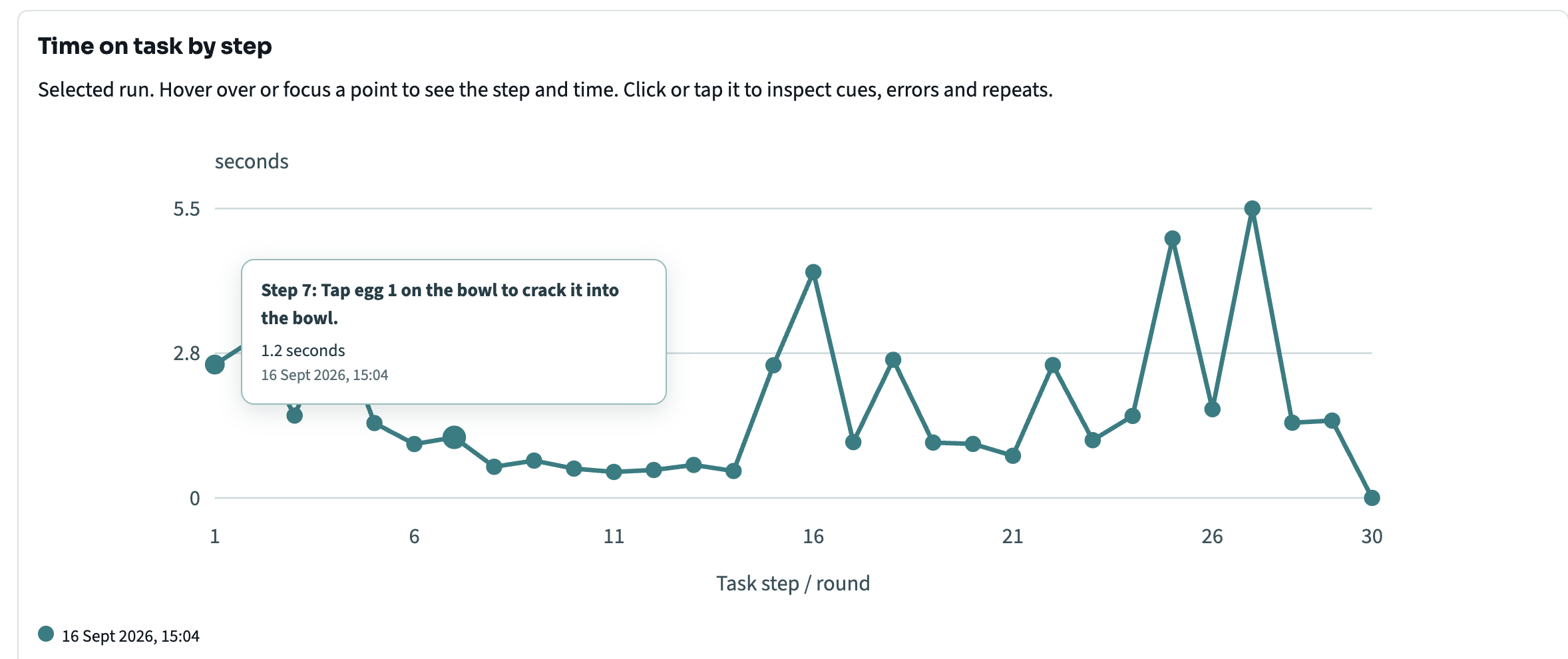
Where available, Studio can show time on task, prompts, retries, scan behaviour, and object interactions, giving you a clearer view of how the task unfolded.

4

What you review

Use the activity summary to discuss where the sequence worked, where it broke down, and what changed when the task was repeated.

Practice growth

Make your practice stand out with immersive activity sessions.

Private OT practices need services that clients, families, case managers, and referrers can understand quickly. Studio gives your team a clear offer: therapist-led immersive activity sessions where clients do something concrete and you have useful material to review afterwards.

For suitable clients, that can support a stronger service story: more engaging appointments, clearer follow-up conversations, and room to package Studio-enabled sessions as part of higher-value private OT work.

Stand out

A more distinctive session offer

Studio gives your practice something clients and families can immediately understand: a therapist-led immersive activity session where the person does something concrete.

Show value

Clearer conversations with families and referrers

Review material gives you useful moments to show and explain, so the value of the session is easier to discuss after the appointment.

Package

Room for higher-value service options

Some practices may choose to include immersive activity sessions inside premium programmes or offer them as a distinct paid option. Pricing remains your decision.

Practice model

A cost you can judge across sessions

Because Studio is priced for the practice rather than per client, you can judge the monthly cost against regular use across suitable appointments.

In the session

Structured tasks the client can do in the room.

CorteXR Studio gives therapists a practical way to add structured VR and AR activities to their existing service. Because the task is spatial, you can observe how the person looks around, searches, reaches, pauses, retries, responds to cues, and manages changes in the activity.

You remain in control of the session. You choose the activity, judge suitability, guide the pace, observe what happens, and decide how to use any review material.

Studio supports activity and observation. You still choose what is suitable and how to interpret it.

Managed Quest 3S immersive activity station arranged for use in a private therapy practice

Where Studio helps

When you need the client to do something observable.

Some sessions need more than discussion. Studio gives you structured tasks where the client searches, chooses, sorts, sequences, pauses, retries, and responds to prompts while you observe what happens.

For suitable clients, the useful moment is often simple: an activity they can try, repeat, vary, and discuss afterwards. Studio helps turn that activity into a clearer conversation about approach, confidence, cueing, attention, and next steps.

A session experience clients can rememberActivities that make observation easierConcrete moments to discuss afterwardsA clearer story for families and referrersA distinctive alternative to worksheet-only activityA practice-level model rather than per-client charging

What you can review

Review what happened in the task.

After the session, Studio gives you practical material to revisit with the client, family, referrer, or wider team. The point is not to generate a verdict. It is to make task behaviour easier to discuss.

Session review

Search and scan pattern

Review where the person looked, what they missed, and how they returned to areas of the scene.

Session review

Sequence and task steps

See where the routine flowed, where it paused, which steps were skipped or repeated, and how prompts changed the activity.

Session review

Time, errors and prompts

Use time on task, errors, prompts, and retries to understand how the activity unfolded without reducing the session to a score.

Session review

Object choices and interaction

Discuss the objects selected, how the person interacted with the scene, and what changed when the task was repeated.

Activity examples

Examples of activities and what they are for.

Each Studio activity should be easy to explain: the client has a task to complete, and you have a reason for choosing it and material to review afterwards.

Activity example

Make a cup of tea

Purpose: work through a familiar everyday routine. Useful observations include sequence, instruction following, time on task, errors, prompts, scanning, and object interactions.

Activity example

Sort everyday objects

Purpose: work through categorisation and rule-following. Useful observations include object choice, hesitation, corrections, distractor handling, and what changed on a repeated attempt.

Activity example

Search a kitchen or room scene

Purpose: practise looking around a spatial scene and returning to missed areas. Useful observations include scan pattern, first targets, missed objects, and response to cues.

Activity example

Follow a multi-step activity

Purpose: practise planning and sequencing. Useful observations include order, pacing, prompts, retries, and how the person adapts when the task changes.

What you get

A supported package for adding Studio to your practice.

Studio is for practices that want to offer immersive activity sessions without assembling the headset, software, onboarding, and support separately. The package brings together the managed headset, Studio software, remote support, and practice access for suitable sessions.

Available for selected practices. Package terms are confirmed during the walkthrough.

Book a 20-minute demo
Practice package Available to selected private OT practices from £150/month.
  • Managed Meta Quest 3S headset included
  • CorteXR Studio VR and AR activity software
  • Therapist onboarding and first-use support
  • Remote support
  • Practice access for suitable client sessions
  • Simple activity and review outputs where available

Ready for practice

Everything needed to start using Studio in sessions.

Studio brings the headset, activity software, onboarding, review material, and support into one practice package. The aim is simple: choose an activity, supervise the session, review what happened, and get help when you need it.

Included

Managed Meta Quest 3S headset

A headset supplied and prepared for practice use, with support for ordinary readiness questions.

Included

CorteXR Studio activities

Structured VR and AR activities such as tea-making, sorting, visual search, and multi-step tasks for supervised sessions.

Included

Therapist onboarding

Support so your team can prepare the headset, choose activities, introduce sessions, and review what happened.

Included

Review material and support

Activity outputs where available, plus remote help with software access, headset readiness, updates, and practical use questions.

Getting started

It is easy to get started.

Start with a short demo, see the activities, and decide where Studio could strengthen the sessions you already offer.

1

Book a 20-minute demo

See example activities, review material, and how Studio could fit your practice.

2

Confirm fit for your practice

We discuss your appointment types, space, team, and the sessions where an immersive activity could genuinely help.

3

Receive the managed headset

The headset arrives prepared for practice use, with Studio software and support included.

4

Get your team ready

We support activity selection, session readiness, and practical questions before first use.

5

Use Studio with suitable clients

You choose the activity, supervise the session, review what happened, and decide how to use the material.

Common questions

FAQ

Do we need to buy a headset?

No. The practice package includes a managed headset for practice use.

What is included?

The package includes a managed VR headset, CorteXR Studio software access, onboarding, remote support, and practice use for suitable client sessions. We confirm practice fit, availability, and package terms during the walkthrough.

Is this charged per client?

No. The package is priced per practice rather than per client.

Can multiple therapists use it?

Yes. Studio is designed for practice use, with onboarding and support for the therapists who will use the system.

What type of sessions is this for?

It may fit sessions where you want a client to take part in a structured activity that involves looking, choosing, reaching, sorting, sequencing, remembering, or responding in space.

Who decides whether an activity is suitable?

You do. Studio provides activity material and review information, but the therapist chooses the activity, supervises the session, and interprets what happened in context.

Professional use

Professional judgement stays with you.

CorteXR Studio is positioned for structured activity sessions within professional practice. You choose the activity, supervise use, and interpret what happened in context. It is not intended to diagnose, treat, monitor, prevent, or alleviate disease, injury, or impairment.

Book the demo

Ready to explore Studio for your practice?

In 20 minutes, we can show the activities, headset, and review material, then talk through where Studio could fit your sessions.

Therapist reviewing Studio session summary material beside a Quest 3S headset and controllers