
What the activity library is for
The Studio activity library gives you useful session material. Each activity creates a structured situation where someone has something to do, something to notice, and something you can observe or discuss.
This is different from passive headset content. Studio activities are not just scenes to look at. They are task-based, configurable, and intended for supervised professional use.
You choose the activity, set the level of challenge where available, guide the session, and decide what the activity means in context.
Choose, configure, and reorder activities
The Studio portal is where you turn individual activities into a practical session programme. You can:
- browse the catalogue by activity type
- read the plain-English purpose and rationale for each activity
- add activities to a named programme
- adjust available settings such as difficulty and hand choice
- reorder the running sequence
- save the programme for use in a supervised session
This keeps the technology in the background. The useful decision remains an occupational therapy one: which activity, in which order, with which level of challenge, for this person today?
The portal visual above is based on the Studio workspace. Available settings differ by activity.
Examples currently available in Studio
| Studio activity | What the person does | Why you might choose it |
|---|---|---|
| Shopping List | Follows a list and selects products in a supermarket scene | A community task with visual search, choices and a clear goal |
| Scrambled Eggs | Works through a longer kitchen routine | Familiar objects, decisions and a sequence to follow |
| A Cup of Tea | Makes a drink in a virtual kitchen | An everyday task with object choices and ordered steps |
| Brushing Teeth | Works through a personal-care routine | Familiar objects and a recognisable sequence |
| Memory Tray | Looks at and recalls a set of objects | Recall strategy and visual attention within an active task |
| Hook-a-Duck | Follows a simple rule while scanning and selecting targets | Rule-following, inhibition, and visual scanning in a short game |
| Frog Smash | Finds and selects targets in a seated game | Visual attention, target selection, and response control |
Activity settings and task demands
Start with the everyday setting or occupation: a community errand, shopping, kitchen activity, personal care or a shorter structured game. Then consider what the task asks the person to do: search, sequence, sort, remember, choose, organise or interact with objects. These demands can appear together in one activity.
Travel and activities in community settings
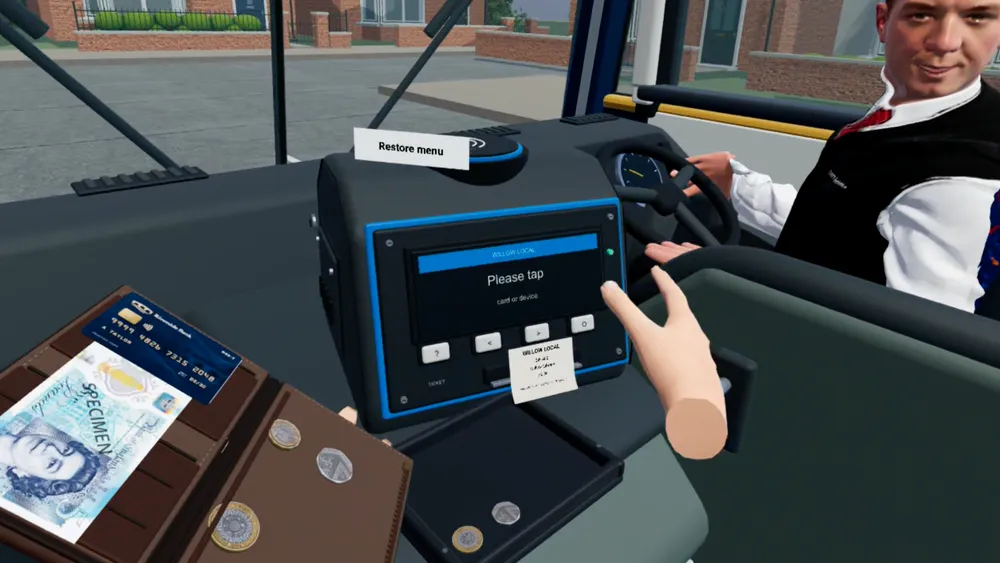
Studio’s community activity scenes include a bus, café, postbox and street crossings. They bring public settings and other people into view, with more visual information and decisions than a simple room task. The therapist can choose a scene in relation to the person’s goals and the demands of the session.
Shopping and community activity
Shopping List brings a supermarket scene into the session. The person can follow a list, locate products and choose between items while you supervise. It offers a community-based task that is difficult to stage with clinic furniture alone.
Kitchen and meal preparation
Kitchen activities put objects, choices and steps inside a familiar setting. The video library includes making tea, toast, beans on toast and scrambled eggs. These tasks differ in length and structure, so the activity can be chosen around the session.
Home and personal care
Brushing Teeth is a recognisable self-care routine involving objects and ordered actions. Studio also includes bathroom and kitchen exploration activities in its portal. These settings can provide a concrete starting point for looking, choosing and interacting with everyday objects.
Memory, leisure and structured games
Memory Tray, Hook-a-Duck and Frog Smash provide shorter tasks where attention, recall, rule use or timed responses are easier to isolate. They sit alongside everyday simulations rather than defining the whole Studio library.
The following task demands remain useful ways to understand and compare activities across these settings.
Visual search
Visual search activities ask the person to look around a scene, find relevant objects, notice where items are placed, and manage distractors.
You may be interested in how the person searches, whether they check the whole scene, whether prompts help, and how visual complexity changes the activity.
Sequencing and planning
Sequencing and planning activities involve steps, order, task structure, and decision points. The person may need to remember what comes next, choose the next item, or continue after a prompt.
The activity can be adjusted by changing the number of steps, amount of structure, prompts, or visual load where the activity supports it.
Memory and attention
Memory and attention activities can involve remembering a short instruction, staying with a task, responding to changing demands, or returning to an activity after interruption.
The focus is not a score in isolation. The useful material is how the person approached the activity, where support was needed, and what you noticed.
Sorting and object use
Sorting and object-use activities ask the person to select, move, group, organise, or respond to objects. These tasks can involve rule-following, categorisation, object choice, and flexible attention.
You may vary the number of objects, category rules, prompts, and task demands.
Activity examples and purpose
These examples show how to think about a task, why you might choose it and what you could observe or discuss afterwards. They are activity-analysis prompts, not a list of automatically recorded measures or claims about treatment or outcomes.
| Example activity | Direct purpose | What the task draws on | What you might observe or discuss |
|---|---|---|---|
| Make a cup of tea | Work through a familiar everyday routine in a controlled virtual kitchen | Sequencing, planning, following instructions, visual search, object use, attention, and error correction | Time on task, errors, prompts, retries, visual exploration, object interactions, and where the sequence broke down |
| Find objects in a room or kitchen | Create a clear visual search task with targets and distractors | Visual search, attention shifting, spatial awareness, object recognition, response to cues | First search area, missed items, distractor choices, prompts, retries, and repeat attempts |
| Sort everyday objects by a rule | Create a visible categorisation and rule-following task | Object choice, rule use, flexible attention, corrections, and persistence | Correct and incorrect groupings, hesitation, response to rule changes, and whether the strategy stayed consistent |
| Follow a multi-step activity | Give the person a structured task path with clear stages | Planning, sequencing, instruction following, pacing, and adjustment after prompts | Step order, skipped steps, repeated steps, pauses, prompts, and changes when the task is repeated |
| Remember and return to an instruction | Add a short memory demand inside an active task | Holding an instruction, returning after interruption, attention, and prompt response | Whether the instruction was retained, where support was needed, and whether a shorter task changed the activity |
Make a cup of tea
This is the clearest kind of everyday simulation: the person works through a familiar routine with a direct task purpose. The activity can involve finding the right items, following the order, responding to prompts, correcting errors, and completing the sequence.
For review, the useful material is not only whether the cup of tea was completed. You can discuss choices, prompts, repeat attempts, object interactions and where the sequence became harder, drawing on your observations and any information that activity records.
Find objects in a room or kitchen
This creates a simple visual search task that is easy to explain from the outside. The person looks around the scene, finds targets, manages distractors, and may repeat the task with different object locations or prompts.
For review, you can look at search pattern, first targets, missed areas, prompt response, and whether the person returns to parts of the scene they did not check first time.
Sort everyday objects
Sorting activities make choices and rules visible. The person may group objects by category, feature, instruction, or task relevance while you observe the strategy they use and how they respond to changes.
For review, you can discuss object choices, hesitations, corrections, distractors, rule changes, and whether the same approach carries through repeated attempts.
Follow a multi-step activity
Sequencing activities are useful when the session needs an ordered task path. The person works through steps, responds to prompts, and may repeat the sequence with more or less support.
For review, you can discuss the step where the task slowed down, whether the next action was chosen independently, what prompts helped, and what changed when the task was repeated.
What you can vary and review
| Activity area | Examples of what can vary | Examples of what can be reviewed |
|---|---|---|
| Visual search | Object placement, distractors, visual load | Search pattern, missed areas, prompts, retries |
| Sequencing | Step count, order, cueing, structure | Sequence path, hesitations, repeated steps |
| Memory and attention | Instruction length, delay, distraction | Recall, task persistence, prompt response |
| Sorting | Number of items, category rule, distractors | Object choices, rule use, error correction |
| Everyday simulations | Scene, objects, task structure | How the activity unfolded, pacing, support needed |
Where an activity records task information, use it alongside your own observation, session notes and professional context.
How graded challenge works
Graded challenge works best when it is practical. It helps you make an activity easier to start, easier to repeat, or more demanding when appropriate.
In Studio, challenge can be described through ordinary activity design rather than clinical promises:
- fewer or more objects
- clearer or less explicit prompts
- shorter or longer sequences
- lower or higher visual load
- simple or changing sorting rules
- more repetition or more variation
- simpler or more complex everyday scenes
The important point is that you control the use of challenge. Studio can provide activity settings and options, but you decide what is appropriate for the person and the session.
How activities support session review
A good activity library makes the session easier to talk about afterwards. Studio activity review can focus on what happened during the task: the person’s choices, how they approached the sequence, support offered and where the activity became harder. Available recorded information differs by activity.
This makes review more concrete. Instead of relying only on a general impression, you can refer back to visible moments in the activity. That can support professional discussion, note-taking, and planning the next session.
Do not overstate this review material. Activity review is not diagnosis, assessment, clinical monitoring, or outcome measurement. It is a way to support therapist-led reflection on the session.
Why this matters for teams
You often need activity variety with limited time, space, equipment, and preparation. Studio can reduce some of that burden by giving your practice a structured set of activities that can be reused, varied, and reviewed.
Across a practice or larger service, the value is not only the activity itself. It is the session structure around it: choose, prepare, supervise, review and decide what to do next.
Choosing the right activity family
Different activity families serve different session needs. You might start with visual search when the aim is to create a simple spatial task, choose sorting when you want object choices and rules, or use sequencing when the session needs a clearer step-by-step structure.
| If the session needs… | Start with… | Why |
|---|---|---|
| A gentle introduction to headset-based activity | Visual search | Simple goal, easy to explain, short activity cycle |
| More hand interaction | Sorting or object use | The person selects, moves, groups, or organises objects |
| More structure | Sequencing and planning | The activity has steps, order, and task progression |
| More working memory demand | Memory and attention | The person holds instructions or returns to the task |
| A familiar context | Everyday simulation | The activity feels closer to ordinary task behaviour |
The library is designed to help you move between these activity families without rebuilding a session from scratch.
Activity library resources
- VR occupational therapy activities
- Visual search and scanning activities for adults
- Visual perceptual activities for adults
- Visual-spatial activities for occupational therapy
- Attention activities for adults
- Sequencing and planning activities for adults
- Memory and attention activities for adults
- Sorting and object-use activities
Studio is non-medical activity software
CorteXR Studio is not intended to diagnose, treat, monitor, prevent, or alleviate any disease, injury, or impairment. It is a therapist-led activity platform and does not replace your professional judgement.
For regulated cognitive stroke rehabilitation, see CorteXR Stroke.
FAQ
Are Studio activities configurable?
Studio activities are designed around configurable challenge where the activity supports it. This may include prompts, complexity, object choices, task structure, or visual demand.
Can I review a session?
Yes. Studio can support session review with the information available for a particular activity, alongside what the therapist observed and noted. This is not diagnosis, assessment, or clinical monitoring.
Are the activities only for occupational therapists?
Occupational therapists are a primary audience, but Studio may also suit other teams that run supervised activity sessions and want structured immersive material.
Are Studio activities rehabilitation activities?
Studio is non-medical activity software. It is not intended to provide rehabilitation, treatment, assessment, diagnosis, monitoring, or outcome measurement.
Can the library support private practice?
Yes. Studio is for independent OTs and practice teams who need useful activity material with practical setup and support. It can also be discussed for larger neurorehabilitation services.
How do I choose an activity?
Start with the session need. You might choose visual search for a simple spatial task, sorting for object choices and rules, sequencing for step-based activity, or everyday simulations for more familiar task-like scenes.
For a more structured decision, use the free OT activity analysis toolkit to map the purpose, demands, support, grading, and review points before choosing an activity.
What makes Studio different from passive VR content?
Studio activities are intended to be task-based and therapist-led. The person does something inside the scene, and you can supervise, guide, vary, and review the activity.
Explore CorteXR Studio
Explore whether the Studio activity library fits your practice.
Book a Studio demo Explore Studio for occupational therapists See Studio for independent OTs